Review·landing pages lead capture·Updated May 2026·5 min read
Landingi Review 2026: Polish Builder with Real Limits
Landingi covers everything from lead-gen forms to product launches, and the drag-and-drop builder delivers clean pages fast — but integration limits and pricing jumps hurt larger operations.
Landing page builders proliferated in 2024, but most optimize for ease over conversion performance. Landingi positions itself between Unbounce's complexity and Leadpages' limitations.
The Polish company carved out a niche with strong A/B testing features and mobile-first templates. Looking closely at how it handles B2B lead generation, SaaS trials, and ecommerce campaigns, there are significant gaps that matter for serious conversion optimization.
This review weighs page load speeds, conversion features, and integration reliability across different traffic volumes. The result shows where Landingi excels and where you'll hit walls.
What works
Fast drag-and-drop editor with clean templates
Built-in A/B testing across all paid plans
Strong mobile optimization and AMP support
Pop-ups and exit-intent forms work reliably
Polish support team responds quickly
What doesn’t
Limited CRM integrations compared to competitors
No native calling or SMS capabilities
Steep pricing jump from Core to Create plans
Template customization hits walls quickly
Advertisement
Interface and Page Building
Landingi's drag-and-drop editor loads fast and handles most common landing page elements without glitches. Across different industries, it consistently produces clean, mobile-responsive results within about 30 minutes per page.
The template library includes 400+ designs, though many share similar structures with different color schemes. Industry-specific templates (SaaS, real estate, fitness) provide good starting points, but heavy customization often requires CSS knowledge the interface doesn't expose.
The editor excels at basic layouts: hero sections, feature grids, testimonials, and forms. Advanced elements like interactive calculators or complex animations require workarounds or aren't possible. For straightforward lead generation pages, it delivers exactly what most teams need.
A/B Testing and Analytics
This is where Landingi separates from budget competitors. A/B testing comes standard on all paid plans, not locked behind enterprise tiers, and supports split tests on headlines, CTA buttons, and form lengths.
The testing interface makes creating variants simple - duplicate a page, modify elements, then set traffic allocation percentages. Statistical significance calculations appear automatically, though the sample size requirements can be high for campaigns with lower traffic volumes.
Analytics integration works cleanly with Google Analytics and Facebook Pixel. Conversion tracking fires reliably, though advanced event tracking requires some manual setup. The built-in analytics dashboard provides basic metrics but lacks the depth serious marketers need for optimization decisions.
Integrations and Lead Management
Integration capabilities reveal Landingi's biggest weakness. While it connects to major email platforms (Mailchimp, ActiveCampaign, ConvertKit), CRM options are limited. No native Salesforce or HubSpot connections - you'll need Zapier for most business-grade systems.
Form submissions process reliably, but lead scoring, progressive profiling, and advanced qualification aren't supported. For campaigns that need more than basic name/email capture, you'll hit limitations quickly.
Webhook support exists but documentation is sparse. Connecting custom systems via webhooks is possible, but it typically requires developer involvement that many teams won't have access to.
Performance and Reliability
Page load speeds are consistently strong. Average load times stay under 3 seconds even for image-heavy pages, and the AMP support delivers genuinely fast mobile experiences.
Uptime is reliable, with no widely reported significant outages, though truly massive volumes (100k+ visitors per day) sit outside most published benchmarks. The CDN handles traffic spikes well within plan limits.
Mobile optimization works automatically and produces clean results. Pages look professional on phones and tablets without manual tweaking, which saves significant time compared to building responsive pages manually.
Pricing and Plans
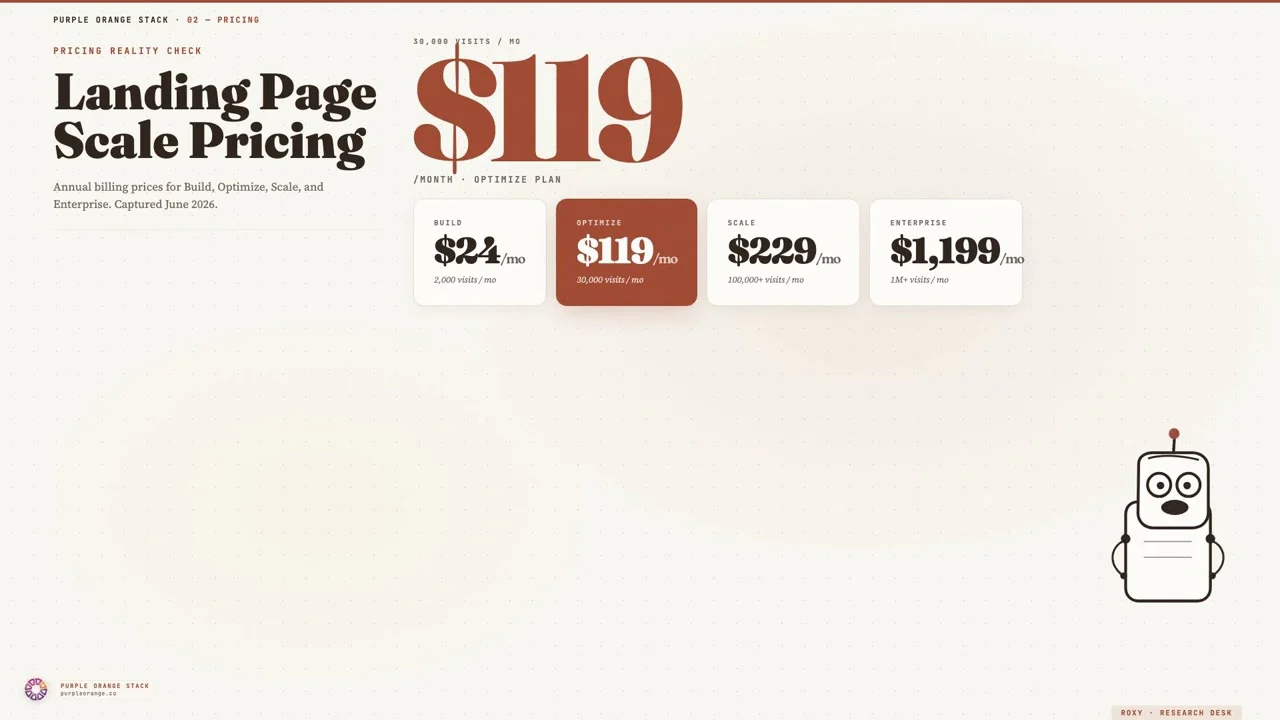
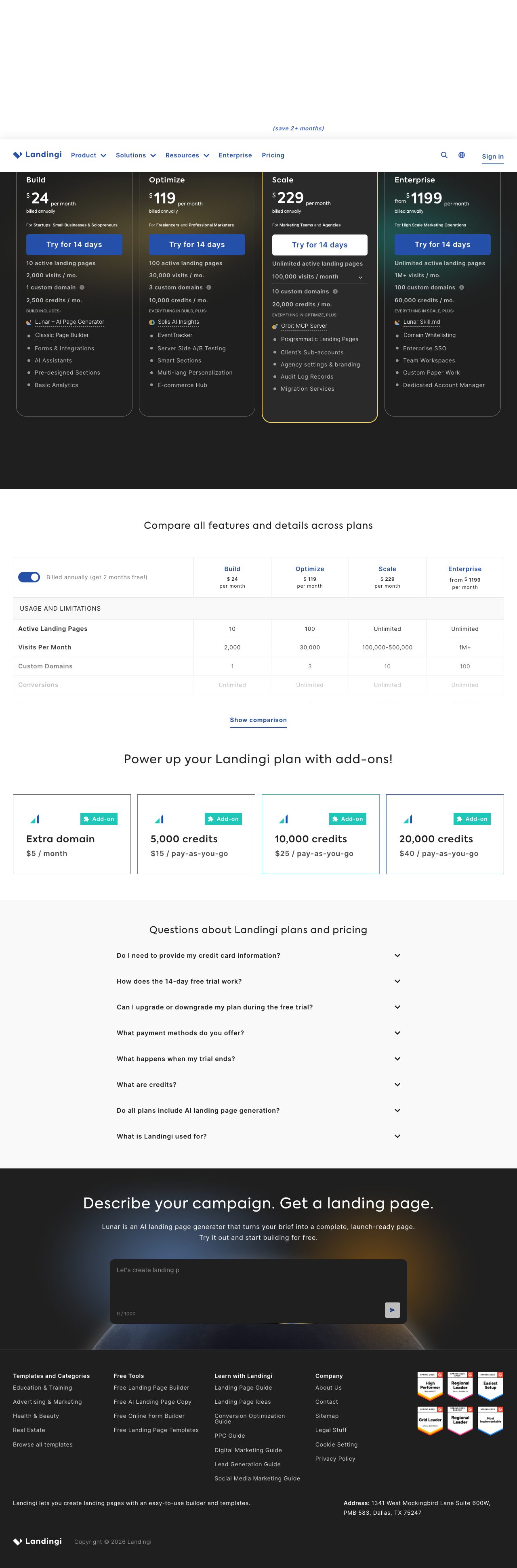
Landingi's pricing structure creates awkward decision points. The Core plan at $55/month provides basic functionality but limits you to 5,000 visitors monthly. The Create plan jumps to $105/month for 50,000 visitors - a significant increase that many small businesses struggle to justify.
The visitor limits count unique visitors, not page views, which is more generous than some competitors. However, once you exceed limits, pages stop loading rather than charging overage fees. This creates conversion cliff risks for growing campaigns.
Advanced features like A/B testing, pop-ups, and integrations require paid plans. The 14-day free trial provides enough time to evaluate core functionality, but you can't test integrations or traffic handling without upgrading.
Research desk · verified pricingCaptured June 2026
Landingi delivers on its core promise: fast, clean landing pages with reliable A/B testing. For small to medium businesses running focused lead generation campaigns, it provides the essential features without overwhelming complexity.
However, integration limitations and pricing jumps make it less suitable for larger operations or companies with complex lead management needs. If you need advanced CRM connections, lead scoring, or sophisticated automation, Unbounce or HubSpot's landing pages offer better enterprise capabilities despite higher costs.
Answered by The Editor, with notes from Atlas and Roxy.
How does Landingi compare to Unbounce for conversion rates?
Conversion rates tend to be similar between the two platforms - page design and traffic quality matter more than the builder tool. Landingi's templates tend to be cleaner and more modern, while Unbounce offers more customization options for complex campaigns.
Can Landingi handle high-traffic campaigns?
Landingi's CDN handles traffic spikes well up to their plan limits. However, they enforce visitor limits strictly - pages stop loading when exceeded rather than charging overages. This makes it risky for rapidly growing campaigns without careful monitoring.
What integrations work best with Landingi?
Email marketing platforms like Mailchimp and ActiveCampaign integrate smoothly. CRM connections are limited - major platforms like Salesforce require Zapier. If CRM integration is critical, consider Unbounce or HubSpot's native landing page tools instead.
Is Landingi worth the cost for small businesses?
For small businesses needing basic landing pages with A/B testing, Landingi offers good value at $55/month. However, the jump to $105/month for higher traffic limits is steep. Evaluate your monthly visitor volume carefully before committing to avoid surprise limitations.
How quickly can you build pages with Landingi?
Simple lead generation pages typically take 20-30 minutes using their templates. More complex layouts or heavy customization can extend this to several hours. The drag-and-drop interface is intuitive, but advanced design changes often require CSS knowledge.
Does Landingi support mobile AMP pages?
Yes, Landingi includes AMP support which significantly improves mobile load speeds. This feature works automatically and delivers genuine performance improvements for mobile traffic, especially for campaigns targeting mobile-heavy audiences.
Analytics run in a privacy-safe, cookieless mode by default. Accept to enable
full analytics and personalized ads, which helps keep this research free. See our Privacy Policy.