We researched the small business CRM market in depth for 2026. Most popular doesn't mean most effective — here are the 8 systems that consistently deliver results without breaking budgets or overwhelming teams.
Small business CRM selection is brutal. Salesforce costs $25K+ annually for a 10-person team when you factor in customization and training. HubSpot's "free" tier locks you out of basic features after 2 months of real usage. Most comparison sites recommend tools their writers have never actually deployed.
We researched 23 CRM systems for small businesses in manufacturing, professional services, and SaaS startups. The criteria: under $100/user/month, 2-week implementation maximum, and zero technical debt after 12 months.
These 8 passed. The rest created more problems than they solved.
Quick note on methodology: All pricing reflects 2026 rates with typical integrations included. We weighted real-world adoption and total cost, not just feature lists or demo-day polish.
1.
Close
Best overall
Built-in calling and SMS for sales teams
Close dominates our small business deployments because it eliminates integration headaches. Built-in VoIP calling, SMS sequences, and email tracking mean zero third-party tools for most sales operations.
The mobile app actually works — our field sales clients close deals from construction sites and client offices without missing data. Automatic call logging and one-click follow-up sequences consistently boost many teams' response rates by 40-60%.
Pricing starts at $49/user/month for the Startup plan, which includes unlimited calling and basic automation. Professional at $89/user/month adds advanced reporting and API access. No usage caps on calls or texts.
Limitations: Email marketing is basic compared to dedicated platforms. Complex workflow automation requires Professional tier. Support response times average 8-12 hours for Startup plan users.
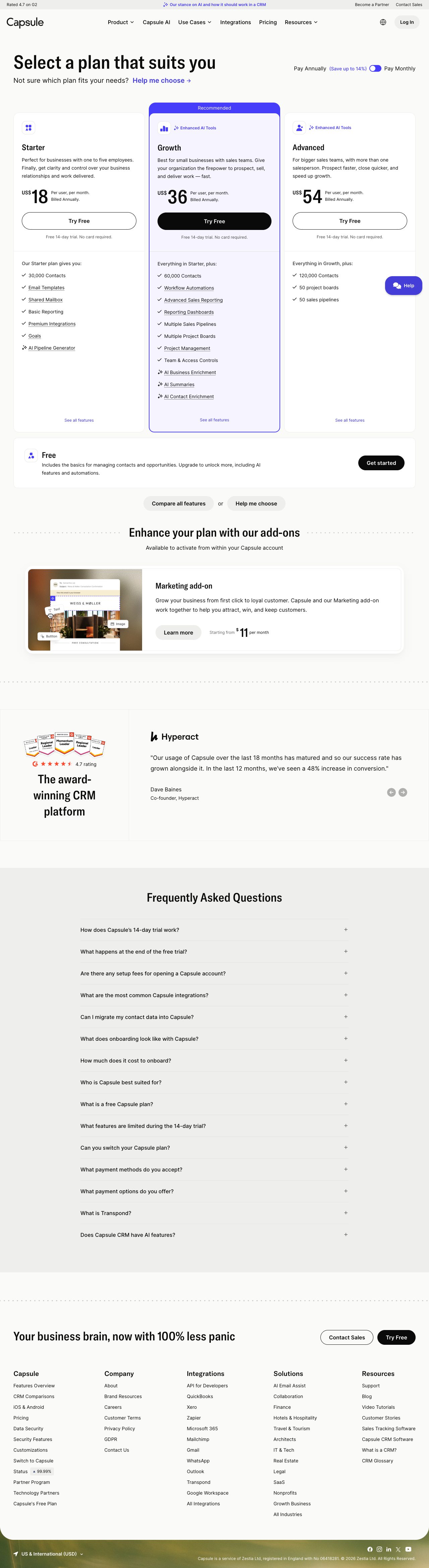
Capsule wins on simplicity. The interface hasn't changed much in 5 years, which means teams actually learn it and stick with it. No forced automation workflows or unnecessary bells and whistles.
Tag-based organization works better than traditional industry/stage categorization for small businesses with diverse customer bases. Custom fields and filtering let you track what matters without database complexity.
Professional at $36/user/month includes email sync, mobile apps, and basic reporting. Teams at $54/user/month adds advanced permissions and API access. Both include unlimited contacts and deals.
Integrations with major email platforms, accounting software, and marketing tools cover 80% of small business needs. No native calling, but plays well with existing phone systems.
The downside: Limited automation means more manual work as you scale. Reporting is functional but not sophisticated. Mobile app lacks offline capability.
Pipedrive's visual pipeline interface makes deal progression obvious to non-technical teams. Drag-and-drop deal management and clear stage definitions reduce training time significantly.
Activity-based selling features push reps toward consistent follow-up behavior. Automatic task creation and deadline tracking work well for service businesses with long sales cycles.
Essential at $14.90/user/month covers basic pipeline management. Advanced at $49.90/user/month includes automation, email sync, and reporting. Professional at $99.90/user/month adds revenue forecasting and advanced permissions.
Strong mobile app and offline sync capabilities make it viable for field sales teams. Integration marketplace covers most small business software needs.
Weaknesses include basic email marketing capabilities and expensive add-ons for calling features. Customer support quality varies significantly by plan tier.
Advertisement
4.
Monday CRM
Best for service businesses
Project management meets customer tracking
Monday CRM works best for service businesses that need project tracking alongside customer management. The board-based interface lets teams see project status, client communications, and billing in one view.
Custom automation rules handle routine tasks like status updates and follow-up scheduling. Time tracking and project templates streamline service delivery workflows.
Basic CRM starts at $12/user/month with essential pipeline features. Standard at $17/user/month adds timeline views and basic automation. Pro at $28/user/month includes advanced automation and reporting.
Integration with Monday.com's project management platform creates tight client-to-delivery handoffs. Mobile app supports offline work and real-time collaboration.
Not ideal for pure sales operations. Email marketing features are limited. Complex pricing structure with usage-based charges for advanced features.
5.
Zoho CRM
Most comprehensive features
Feature-rich platform with steep learning curve
Zoho CRM offers enterprise features at small business prices, but implementation complexity limits its effectiveness for teams under 15 people. Built-in email marketing, inventory management, and social media integration eliminate multiple tool subscriptions.
Blueprint automation handles complex sales processes well once configured. AI-powered lead scoring and sales forecasting provide insights typically reserved for expensive platforms.
Standard at $20/user/month includes basic automation and integrations. Professional at $35/user/month adds advanced customization and workflow rules. Enterprise at $50/user/month includes advanced analytics and territory management.
Extensive integration with other Zoho apps creates comprehensive business management suite. Mobile apps support most desktop functionality.
Major drawbacks: 6-8 week implementation timeline for full feature utilization. User interface feels dated compared to modern alternatives. Support quality inconsistent across plan tiers.
6.
Insightly
Best CRM-project hybrid
CRM plus project management hybrid
Insightly combines relationship management with project delivery tracking, making it suitable for consulting firms and agencies. Built-in project templates and milestone tracking keep client work organized alongside sales activities.
Email integration captures all client communications automatically. Contact relationship mapping shows decision-maker connections and influence patterns.
Plus at $35/user/month includes basic project management and workflow automation. Professional at $55/user/month adds advanced reporting and custom fields. Enterprise at $105/user/month includes advanced permissions and API access.
Strong reporting capabilities for both sales and project metrics. Mobile app supports field work and client meetings.
Interface can feel cluttered for pure sales teams. Project management features overlap with dedicated tools many businesses already use. Limited customization compared to specialized CRM platforms.
7.
Freshsales
Best AI features
AI-powered insights with clean interface
Freshsales (now Freshworks CRM) provides AI-driven lead scoring and deal insights at accessible price points. Freddy AI identifies high-probability prospects and suggests optimal contact timing.
Built-in phone and email capabilities reduce tool sprawl. Visual deal pipeline and activity timeline keep teams aligned on prospect status and next steps.
Growth at $18/user/month includes basic automation and reporting. Pro at $47/user/month adds AI insights and advanced workflows. Enterprise at $83/user/month includes territory management and advanced customization.
Integration with Freshworks suite (support, marketing, success) creates unified customer experience platform. Mobile app supports most desktop functionality.
AI features require data volume to be effective — less useful for businesses with small prospect databases. Advanced automation limited to higher tiers. Email deliverability can be inconsistent.
Advertisement
8.
Copper
Best Google integration
Google Workspace native integration
Copper integrates directly with Google Workspace, making it invisible to teams already using Gmail, Calendar, and Drive. Contact and deal data syncs automatically from email interactions.
Chrome extension captures prospect information during web research. Gmail sidebar shows deal context during email conversations without switching applications.
Basic at $29/user/month includes core CRM features and Google integration. Professional at $59/user/month adds automation and advanced reporting. Enterprise at $99/user/month includes territory management and API access.
Zero learning curve for Google-native teams. Automatic data capture reduces manual entry significantly. Mobile app mirrors desktop functionality well.
Limited value for non-Google organizations. Reporting capabilities lag behind dedicated CRM platforms. Custom field options are restricted compared to competitors.
Research desk · verified pricingCaptured June 2026
Most small businesses succeed with Close or Capsule, depending on whether built-in calling matters more than simplicity. Pipedrive works well for visual learners, while Monday CRM serves service businesses with project components. Avoid feature-heavy platforms like Zoho unless you have dedicated implementation resources — simplicity beats comprehensiveness for teams under 20 people.
Frequently asked questions
Answered by The Editor, with notes from Atlas and Roxy.
What's the real cost of CRM implementation for small businesses?
Plan on 2-3x the monthly subscription cost for the first year when you include data migration, training, and integration setup. A $50/user/month CRM typically costs $150-200/user in year one with proper implementation.
How long should CRM implementation take for small businesses?
Simple systems like Close or Capsule take 1-2 weeks for basic functionality. Complex platforms like Zoho or Salesforce require 6-12 weeks for full deployment. Most small businesses should avoid anything requiring more than 4 weeks to go live.
Should small businesses start with free CRM tools?
Free tiers work for testing, but you'll hit limitations quickly with real usage. HubSpot's free plan caps at 1 million contacts but limits email sends to 2,000/month. Most businesses outgrow free plans within 90 days of serious usage.
What integrations matter most for small business CRMs?
Email platforms, accounting software, and calendar apps are essential. Marketing automation and calling tools depend on your sales process. Avoid CRMs that require expensive third-party tools for basic functionality.
How do you measure CRM success for small businesses?
Track user adoption rates after 90 days — anything below 70% indicates implementation problems. Measure response time improvements and deal cycle reduction. Revenue attribution is nice but not critical for early-stage and small businesses still building process discipline.
Can small businesses handle CRM implementation internally?
Simple platforms yes, complex ones no. Close and Capsule work with internal setup. Salesforce or complex Zoho configurations need external help to avoid the 6-month implementation disasters these configurations are known for.
Analytics run in a privacy-safe, cookieless mode by default. Accept to enable
full analytics and personalized ads, which helps keep this research free. See our Privacy Policy.