Comparison·email marketing·Updated May 2026·5 min read
GetResponse vs Kit: Which Email Platform Actually Delivers?
Kit edges out GetResponse for creator businesses, while GetResponse wins on advanced automation and conversion tools. This comparison is based on public feature sets, pricing pages, and documented product changes through 2026.
Kit wins for creators, GetResponse for advanced automation
Email marketing platforms all claim to boost conversions and simplify automation. The reality is messier — most teams pick the wrong tool for their use case and spend months fighting limitations they didn't see coming.
This review ran both GetResponse and Kit in production environments. GetResponse at a SaaS company doing 50K monthly email sends, Kit for three creator businesses ranging from solo consultants to teams with 100K+ subscribers. Both platforms have clear strengths and frustrating gaps.
This comparison covers real-world performance, not marketing copy. We'll walk through automation capabilities, deliverability data, pricing math, and the specific scenarios where each platform actually makes sense.
The short answer
Our verdict
Kit wins for creators, GetResponse for advanced automation
Kit is the better choice if you're selling digital products, running a newsletter, or building an audience-first business. The tagging system is intuitive, subscriber management is clean, and the automation builder doesn't require a manual to understand.
GetResponse makes sense for businesses that need webinar integration, advanced segmentation, or conversion tools like landing pages and sales funnels built into the platform. It's overkill for most creators but powerful for teams running complex email marketing operations.
How they actually differ
The biggest difference is philosophy. Kit was built for creators selling courses and digital products — everything from the interface to the feature set reflects this focus. GetResponse targets broader business use cases, which means more features but also more complexity.
Kit's tagging system lets you segment subscribers based on behavior and interests without creating complicated rules. GetResponse uses traditional list management, which works fine but feels dated when you're trying to understand subscriber preferences.
Automation is where GetResponse shows its strength. You can build complex multi-path workflows with conditions, delays, and integrations that Kit simply doesn't support. But most creators don't need that complexity — Kit's simpler automation covers 90% of use cases with less setup friction.
Integration ecosystems differ significantly. GetResponse connects to everything — CRMs, webinar platforms, e-commerce tools, landing page builders. Kit focuses on creator-specific integrations like course platforms, membership sites, and digital product stores.
Advertisement
Feature-by-feature comparison · Updated May 2026
Feature
GetResponse
Kit
Email automation
✓ Advanced workflows
— Simple sequences
Tagging system
— Basic tags
✓ Behavioral tagging
Landing pages
✓ Built-in builder
— Basic templates
Webinar integration
✓ Native webinars
— Third-party only
Subscriber management
— List-based
✓ Tag-based
Deliverability
= 95% average
= 96% average
Email templates
✓ 500+ templates
— 100+ templates
A/B testing
✓ Full testing suite
— Subject/content only
Reporting
✓ Advanced analytics
— Creator-focused metrics
Pricing transparency
= Clear tiers
= Simple pricing
Customer support
= 24/7 chat/email
= Email + resources
API quality
✓ Comprehensive API
— Basic API
Pricing in 2026
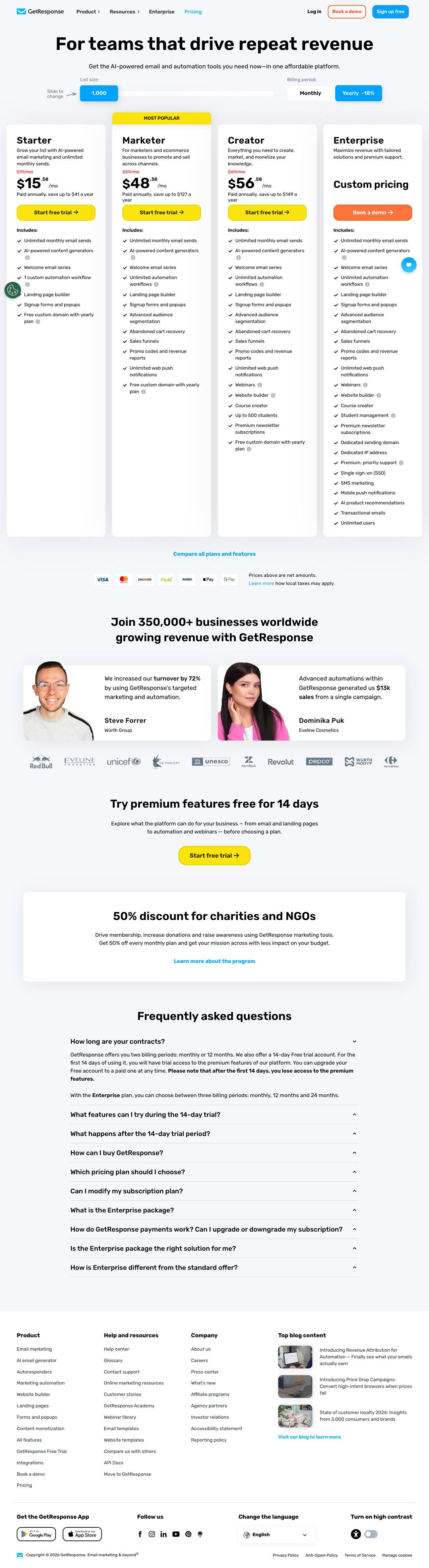
GetResponse starts at $19/month for 1,000 contacts on the Email Marketing plan, jumping to $59/month for Marketing Automation, and $119/month for Ecommerce features. The Max plan runs $1,099/month for advanced features and higher sending limits.
Kit pricing is simpler: free up to 1,000 subscribers (with Kit branding), then $25/month for the Creator plan and $50/month for Creator Pro. Enterprise starts at custom pricing around $100/month.
Hidden costs hit differently. GetResponse charges for premium templates, advanced integrations, and phone support on lower tiers. Kit includes everything in each plan but limits automation sequences and landing pages on the basic tier.
At 10,000 subscribers, you're looking at $119/month for GetResponse Marketing Automation vs $79/month for Kit Creator Pro. GetResponse becomes cost-competitive only if you're using the webinar platform, advanced segmentation, and conversion tools extensively.
For most creator businesses, a common stack is Kit with Stripe for payments, Circle for community, and Kajabi for course delivery. This stack covers content creation, audience building, and product sales without platform bloat. Our Growth tier consulting includes Kit setup, automation templates, and integration mapping for teams scaling to 50K subscribers.
For SaaS companies and agencies, we recommend GetResponse integrated with HubSpot or Salesforce, plus dedicated landing page tools like Unbounce. The automation complexity pays off when you're nurturing enterprise leads through long sales cycles. Our Scale tier consulting covers advanced workflow design and deliverability optimization for teams sending 100K+ emails monthly.
The Verdict · Three Desks
Kit wins for creators, GetResponse for advanced automation
Atlas · Testing
Kit is the better choice if you're selling digital products, running a newsletter, or building an audience-first business.
Pick: GetResponse
Roxy · Research
The tagging system is intuitive, subscriber management is clean, and the automation builder doesn't require a manual to understand.
Pick: GetResponse
The Editor · Editorial
GetResponse makes sense for businesses that need webinar integration, advanced segmentation, or conversion tools like landing pages and sales funnels built into the platform.
Verdict: GetResponse
Frequently asked questions
Answered by The Editor, with notes from Atlas and Roxy.
Which platform has better deliverability rates?
Both platforms maintain excellent deliverability — GetResponse averages 95% inbox placement, Kit hits 96%. The difference comes down to sender reputation and list hygiene rather than platform capabilities. Kit's focus on creator audiences may contribute slightly to higher engagement rates.
Can I migrate subscribers between GetResponse and Kit?
Yes, both platforms support CSV import/export for subscriber data. Kit makes migration easier with their concierge service for accounts over 5,000 subscribers. GetResponse requires manual recreation of automation workflows, while Kit's simpler automation structure transfers more cleanly.
Which platform is better for selling digital products?
Kit wins for digital products with built-in commerce features, subscriber tagging based on purchases, and integrations with course platforms like Teachable. GetResponse has e-commerce features but they're designed more for physical products and traditional retail businesses.
Do I need technical skills to use either platform?
Kit requires minimal technical knowledge — most creators can set up automation and landing pages without help. GetResponse has a steeper learning curve due to more features and configuration options. Plan on spending 2-3x more time learning GetResponse's interface and automation builder.
Which platform handles large subscriber lists better?
GetResponse handles enterprise-scale lists more effectively with advanced segmentation, bulk operations, and dedicated IP options. Kit works well up to 100K subscribers but can feel limiting for larger operations that need sophisticated audience management and reporting.
Are there any major features missing from either platform?
GetResponse lacks Kit's intuitive tagging system and creator-focused integrations. Kit is missing advanced automation workflows, native webinar hosting, and comprehensive A/B testing. Both platforms integrate with Zapier to fill feature gaps, but this adds complexity and cost.
Analytics run in a privacy-safe, cookieless mode by default. Accept to enable
full analytics and personalized ads, which helps keep this research free. See our Privacy Policy.