Dify Review: The Open-Source LLMOps Platform That Ships AI Apps Without the Boilerplate
Dify is one of the most complete open-source platforms for building production AI applications without drowning in infrastructure code. Visual workflow builder, RAG pipelines, agent framework, and model management in one interface — free to self-host, or $59/month cloud. Its large GitHub community makes it a serious starting point for teams building AI products.
Most teams building AI applications spend more time on infrastructure boilerplate than on the actual intelligence layer. Connecting LLM APIs, managing context windows, building RAG pipelines, orchestrating multi-step agent flows — all of this work is necessary but not differentiating. Dify exists to collapse that infrastructure work so teams can focus on what their AI actually does.
Built by LangGenius, Inc. and open-sourced from day one, Dify had 147,000+ GitHub stars when checked on June 29, 2026. The platform combines a visual workflow builder for non-code AI pipelines, a built-in RAG engine for document-grounded responses, and an agent framework supporting both ReAct and Function Calling reasoning strategies.
In 2026, Dify has become a standard tool in the stack for teams building internal AI tools, customer-facing chatbots, and complex agentic workflows. The name stands for "Do It For You" — and the platform's core promise is letting both developers and non-technical operators go from AI prototype to production without weeks of infrastructure work.
What works
Best-in-class visual workflow builder for AI pipelines — minimal code required
Built-in RAG engine handles document ingestion, chunking, and retrieval natively
Free self-hosted option with full feature parity — only pay infra and API costs
147,000+ GitHub stars checked June 2026 — strong open-source community
Supports every major LLM: OpenAI, Anthropic, Llama, Azure, Hugging Face
Agent Node enables true autonomous agent behavior within visual workflows
What doesn’t
Moderate learning curve for advanced workflow features and agent configuration
Self-hosting requires DevOps setup and ongoing infrastructure management
Cloud message credits can limit high-volume production deployments
Enterprise governance features (SSO, compliance) require Enterprise tier
Advertisement
Visual Workflow Builder: The Core Differentiator
Dify's workflow builder is the feature that separates it from alternatives. You design AI pipelines by connecting nodes on a canvas — LLM calls, knowledge base retrievals, conditional branches, code execution blocks, HTTP requests, variable manipulation, and more. The interface is genuinely intuitive: a developer who has never touched Dify can understand and modify a workflow in minutes.
The Agent Node is the standout addition. Unlike fixed linear flows, the Agent Node can autonomously decide which tools to call, when to retrieve context, and when to respond. It supports both Function Calling (structured tool use via OpenAI-style function calls) and ReAct (reason-then-act chain-of-thought) reasoning strategies, giving you flexibility in how your agents think and act.
For non-technical operators, the workflow builder opens up AI application development that would otherwise require a full engineering sprint. A marketing team can build a content generation pipeline; an ops team can build a document analysis workflow — without touching Python.
RAG Engine: Document-Grounded AI That Works Out of the Box
Dify's built-in RAG engine handles the full document pipeline in one interface: upload documents (PDF, TXT, HTML, Markdown), configure chunking strategies, and Dify manages embedding and retrieval automatically. You don't need to wire up a separate vector database, manage embedding jobs, or build a retrieval layer from scratch.
For teams building AI that needs to answer questions from company documents — support knowledge bases, internal wikis, product documentation, contract repositories — the RAG engine eliminates weeks of infrastructure work. The quality is solid for standard document types, and chunking configuration allows fine-grained control for specialized retrieval requirements. Cloud plans include 50MB to 20GB of knowledge storage; self-hosted users are limited only by their own infrastructure.
Self-Hosting vs Cloud: The Decision Framework
Self-hosted Dify is free — deploy via Docker on any VPS or cloud instance and pay only for infrastructure and LLM API usage. A $20–40/month VPS handles small-to-medium workloads comfortably. For regulated industries or teams with data residency requirements, self-hosting is often the only viable path.
Cloud is the right choice for teams without DevOps resources who need managed uptime, automatic updates, and support SLAs. Professional at $59/month covers most small team needs with 5,000 monthly credits — roughly 5,000 LLM interactions depending on model and pipeline complexity. The practical recommendation: start with Sandbox to evaluate the platform, then self-host for production if you have infrastructure capability.
Pricing: What You Get at Each Tier
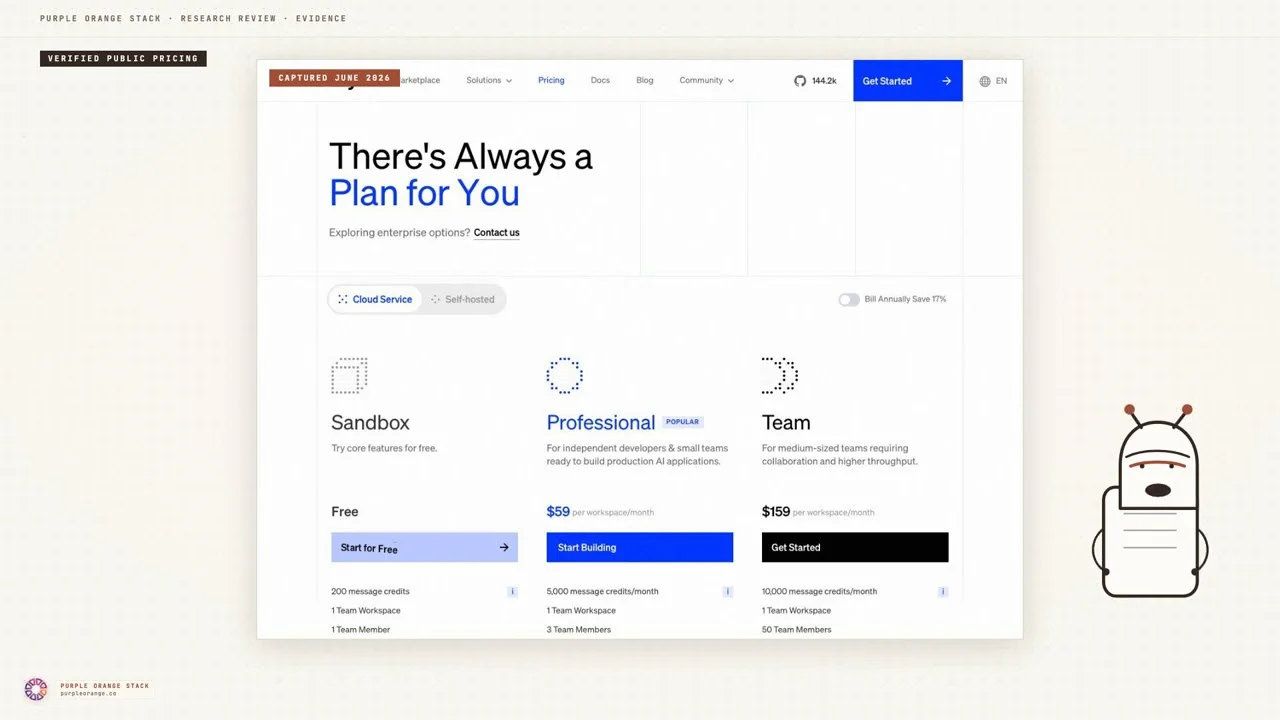
Sandbox is generous enough to build real prototypes — 200 credits, 5 apps, 50MB storage, full feature access. It's a genuine evaluation environment, not a crippled demo. Professional at $59/month is the right tier for indie developers and small teams building a single production application. Team at $159/month scales to 50 members, 200 apps, 20GB storage — appropriate for mid-sized organizations running AI across multiple teams. Annual billing saves $118 (Professional) or $318 (Team) per year.
Research desk · verified pricingCaptured June 2026
Dify Is the Default Starting Point for AI Application Development in 2026
Dify has earned its position as a leading open-source LLMOps platform. The visual workflow builder genuinely bridges the gap between no-code experimentation and production deployment. The RAG engine eliminates weeks of document pipeline work. The agent framework handles complex reasoning without custom orchestration code. And the self-hosting option keeps serious AI development accessible.
For teams evaluating AI application platforms in 2026, Dify should be one of the first tools on the list before considering closed-source alternatives. Its 147,000+ star GitHub community, active development pace, and free self-hosted option make it a low-risk starting point. Start with the Sandbox tier, build a workflow against your actual use case, and evaluate fit before committing to cloud paid plans or self-hosted infrastructure investment.
Answered by The Editor, with notes from Atlas and Roxy.
What is Dify and what does it do?
Dify is an open-source LLMOps platform for building AI applications, agents, and workflows. It includes a visual workflow builder for AI pipeline design, a built-in RAG engine for document-grounded responses, an agent framework supporting ReAct and Function Calling, and model management supporting OpenAI, Anthropic, Llama, Azure, Hugging Face, and more.
Is Dify free to use?
Yes — Dify's open-source self-hosted version is completely free. You only pay for your own infrastructure (a basic VPS runs $20–40/month) and LLM API costs. The cloud version has a free Sandbox tier with 200 message credits/month. Paid cloud plans start at $59/month for the Professional plan.
How much does Dify cloud cost?
Dify cloud: Sandbox (free, 200 credits/month, 1 user, 5 apps), Professional ($59/month, 5,000 credits, 3 team members, 50 apps, 5GB knowledge storage), Team ($159/month, 10,000 credits, 50 members, 200 apps, 20GB storage). Enterprise is custom pricing.
Should I self-host Dify or use the cloud version?
If your team has DevOps capability, self-hosting is better — you get the full platform free with complete data control. A basic self-hosted setup on a $20–40/month VPS handles small-to-medium workloads. Choose cloud if your team lacks infrastructure expertise or if managed uptime and support matter more than data sovereignty.
What can you build with Dify?
Common Dify use cases: internal knowledge bases (RAG-powered chatbots from your company documents), customer-facing AI assistants, multi-step agentic workflows, AI-powered internal tools, and production LLM applications with monitoring. Supports text generation, chat apps, agent apps, and visual workflow apps.
How does Dify compare to LangChain or n8n?
LangChain is a Python framework requiring code — Dify provides a visual interface for the same types of applications with less code. n8n is a general workflow automation tool; Dify is purpose-built for LLM-powered workflows with built-in RAG, model management, and agent reasoning. Teams often use Dify for AI orchestration and n8n for broader business automation.
Analytics run in a privacy-safe, cookieless mode by default. Accept to enable
full analytics and personalized ads, which helps keep this research free. See our Privacy Policy.